Is CTRTool a Fit as Your ClickSEO CTR Manipulation Alternative?
You are paying for CTR campaigns and still guessing whether the clicks actually happened. Some tools hand you a dashboard number and nothing else, which makes it hard to justify the spend or compare platforms. Before you switch, you need to know what a credible alternative should prove.
This article breaks down CTRTool's campaign types, controls and credit model, then weighs whether it fits as a ClickSEO CTR manipulation alternative. You will finish knowing which features matter, where the limits sit, and whether it suits your keywords and budget.
What Is CTRTool and Who Is It Built For?
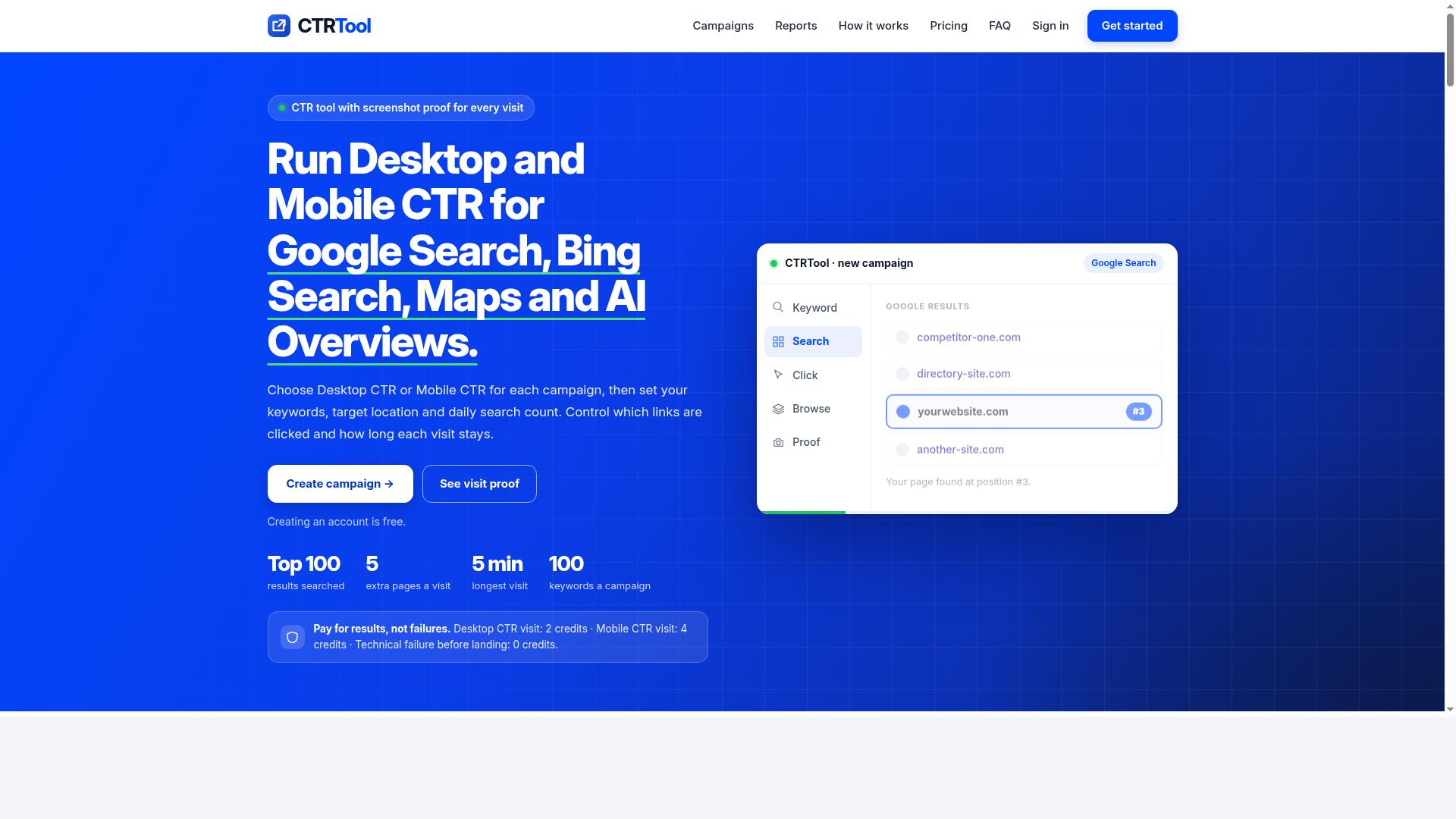
CTRTool is a SaaS platform that runs click-through-rate (CTR) campaigns for Google Search, Bing Search, Google Maps, and AI Overviews, designed for SEO practitioners and agencies who need measurable proof of every simulated visit. It is a CTR campaign tool built around evidence rather than guesswork, with screenshot proof attached to each visit.
The platform suits SEO professionals managing their own sites or client properties across multiple search surfaces. Campaigns can target a chosen country, with an optional state and city, so location-specific targeting stays precise.
That focus on proof and location control makes it a credible CTR manipulation alternative for teams weighing their options. The site is also direct about limits, stating that automated visits do not guarantee rankings.
Campaign Types: Google Search, Bing, Maps and AI Overviews
CTRTool offers four distinct campaign types: Google Search CTR, Bing Search CTR, Google Maps CTR, and AI Overview CTR, each with its own targeting rules and eligibility checks. Every campaign type delivers screenshot proof for each visit, so results can be reviewed rather than assumed.
For Google and Bing Search CTR, the page must appear in the top 100 organic results for the chosen keyword and location. Users select Desktop or Mobile CTR per campaign, and internal pages are also targetable. Each campaign supports up to 100 keywords, with search depth up to 100.
Google Maps CTR works differently. Campaigns check up to 50 listings (about five pages) to find the business listing, then click its website link. City targeting keeps the search local and relevant.
AI Overview CTR requires a matching citation. The campaign finds the website in the overview and clicks its source link, with citation order tracked in reports.
Across all types, users control click order, scrolling time, and up to five additional pages per visit, with visits lasting up to five minutes total. Reports capture full visit paths, search and website screenshots, and keyword positions over time, including Search positions, Maps listing order, and AI citation order.
Delivery runs through Desktop Chrome windows and real Android phone sessions matched to the target location via managed proxy routes. Custom form filling or other custom actions are available through support with a separate agreed one-time fee.
Is CTRTool a Fit as Your ClickSEO CTR Manipulation Alternative?
If you are evaluating ClickSEO as a CTR manipulation tool, CTRTool presents a distinct alternative centered on verifiable screenshot proof for every visit and support for AI Overviews alongside traditional search and Maps campaigns. The question is whether that combination fits your SEO strategy, your budget, and the way you measure a CTR campaign.
CTRTool is positioned as a CTR tool with screenshot proof for every visit. Its site describes it plainly: CTR campaigns for Google Search, Bing Search, Maps and AI Overviews, with proof for every visit. That single sentence captures what makes it different from a typical CTR manipulation alternative.
To decide whether it is a fit, compare the two tools on the dimensions that matter most in a feature comparison: where campaigns can run, how visits are proven, and how you pay.
| Dimension | CTRTool | ClickSEO |
|---|---|---|
| Campaign surfaces | Google Search, Bing Search, Maps and AI Overviews | Verify current surface list directly with the vendor |
| Proof mechanism | Screenshot proof for every visit | Confirm what reporting is provided before buying |
| Pricing model | Credit-based monthly plans | Confirm current plans and billing terms with the vendor |
| Targeting | Global targeting by country, state and city | Confirm available targeting options before comparing |
On campaign surfaces, CTRTool covers the places where SERP visibility now matters. That includes classic Google and Bing results, local Maps listings, and AI Overviews, which is a meaningful distinction for anyone running a modern CTR campaign.
On proof, the screenshot-per-visit approach gives you a record you can review rather than a summary number. For teams cautious about click fraud detection and traffic quality, that transparency is a practical reason to shortlist the tool.
On pricing, credit-based monthly plans let you scale click volume up or down as your keyword ranking priorities shift. The site also advises a measured rollout: start with tier links, PBNs and test properties, and use CTR on main sites with caution. That guidance is worth weighing against your own risk tolerance.
If you need multi-surface coverage, documented proof, and flexible monthly credits, CTRTool is a credible alternative platform. Confirm ClickSEO's current capabilities directly before a final decision, then match each tool to your campaign goals.
Key Features That Set CTRTool Apart
CTRTool differentiates itself through verifiable visit proof, granular campaign controls, and performance tracking that includes keyword positions over time. These are not cosmetic extras. They are the features that decide whether a CTR campaign is auditable and controllable, or a black box you have to take on faith.
For anyone weighing a CTR manipulation alternative, the practical question is simple: can you see what happened, and can you steer it? CTRTool answers both with proof images, full visit paths, and settings that shape how each visit behaves.
The two subsections below cover the proof side and the control side. Together they explain why this CTR manipulation tool stands apart in an SEO tool comparison built on transparency rather than promises.
Screenshot Proof and Full Visit Paths for Every Visit
Every CTRTool visit generates separate search and landing screenshots as proof, along with the full visit path, so you can audit exactly how each click was executed. The two images are distinct: one captures the search, the other captures the landing page. That separation matters because it shows both the discovery step and the arrival step.
The full visit path adds the sequence of actions taken during the visit, not just a start and end point. You can follow how the click was carried out from the search through to the pages visited. This is the kind of detail a simple click counter can never provide.
That proof has a practical use beyond your own records. It can be shown to clients or stakeholders to demonstrate campaign activity with evidence rather than a summary report. When someone asks what a campaign actually did, you have images and a path to point to.
This level of verification is a core unique selling point for CTRTool. It also speaks directly to click fraud detection concerns. Transparency of this kind lets a reviewer confirm that visits were real browsing sessions, not anonymous pings counted by a script.
Reports in CTRTool include these full visit paths and screenshots, so the evidence stays attached to the campaign record. For a CTR campaign where trust is the sticking point, that audit trail is often the deciding factor.
Campaign Controls: Desktop vs Mobile, Keywords, Location and Daily Search Count
CTRTool lets you choose Desktop CTR or Mobile CTR per campaign, set target keywords, define location down to city level, and control the daily search count to mimic natural user behavior. Each control shapes a different part of the visit, and together they let a campaign look like ordinary organic traffic rather than a uniform burst.
Device choice affects both realism and cost. Desktop visits cost 2 credits, while Mobile visits cost 4 credits based on the pricing data. Delivery matches the device: Desktop Chrome windows for desktop campaigns, and real Android phone sessions for mobile ones.
Keyword targeting has one clear condition. The page must rank in the top 100 results for the keyword, and search depth can be set up to 100. That keeps targeting tied to keywords where your page can realistically be found.
Location targeting covers country, state, and city, or Any country for a mixed audience. Visits are matched to the target location through managed proxy routes, and visits that cannot verify the requested location use no credits.
- Daily search count sets pacing, with now, spread out, or gap timing, plus days, hours, and time zone. Daily goals reset at 00:00 UTC.
- Up to 100 keywords per campaign, with up to 100 campaigns on one shared credit balance.
- Visit depth of up to five additional internal pages, with visits lasting up to five minutes total.
Pacing is what separates a natural pattern from an obvious spike. Spreading searches across hours and days, with varied device and location settings, produces user behavior signals that resemble genuine interest. That is the core of credible traffic simulation, and it is why these controls matter as much as the click itself.
Pricing and Plans
CTRTool offers monthly subscription plans in USD, with credits that are consumed based on campaign type and device targeting. That structure makes the entry price easy to read at a glance, but the real cost depends on how many credits each visit type uses.
Because Desktop and Mobile visits draw down credits at different rates, the same plan can fund very different campaign volumes. The breakdown below shows what each tier actually delivers in visits.
Credit Model and Pay-for-Results Rules
CTRTool's credit model charges 2 credits per Desktop CTR visit and 4 credits per Mobile CTR visit, with monthly plans starting at $59 for 2,000 credits. That works out to up to 1,000 Desktop CTR visits or 500 Mobile CTR visits on the entry tier.
The full plan lineup scales in even steps, so you can match spend to campaign size:
- Starter: $59/month for 2,000 credits (up to 1,000 Desktop or 500 Mobile visits)
- Growth: $125/month for 5,000 credits (up to 2,500 Desktop or 1,250 Mobile visits), marked Recommended
- Scale: $399/month for 20,000 credits (up to 10,000 Desktop or 5,000 Mobile visits)
- Agency: $699/month for 40,000 credits (up to 20,000 Desktop or 10,000 Mobile visits)
Credits are only consumed when a visit is successfully completed and proof is generated, which is the core of the pay-for-results model. A verified search without a match costs 1 credit, and a technical failure before landing costs 0 credits. Unused credits roll over while your subscription stays active and expire once cancellation takes effect. Creating an account is free, and custom development carries a separate, agreed one-time fee.
Campaign eligibility also shapes value. Search campaigns require the page to rank in the top 100 results, while Maps campaigns check up to 50 listings. If your target sits outside those bounds, the campaign cannot run, so confirm eligibility before committing credits to a plan.
One timing note matters for a pricing comparison: CTRTool's page lists limited launch pricing with prices rising 30% on November 15. Locking in a plan early protects your effective rate per visit.
Trust Signals: Proof, Transparency and Legal Notices
CTRTool builds trust through screenshot proof for every visit, transparent campaign tracking, and publicly accessible legal notices at ctrtool.com/licenses.html. These elements give users something concrete to check rather than vague assurances. When evaluating any CTR manipulation tool, evidence you can verify matters more than marketing claims.
Trust in a CTR boosting software category is not automatic. Buyers reasonably ask whether clicks are real, whether campaigns can be audited, and whether the provider operates openly. CTRTool addresses these questions through documented, inspectable features rather than promises.
Screenshot proof stands out as the most direct trust signal. Each visit in a CTR campaign is backed by a screenshot, giving users visual evidence that the click was actually delivered. This is meaningful because the entire value of a CTR manipulation alternative depends on whether clicks genuinely occur.
Instead of asking users to take delivery on faith, CTRTool provides verifiable evidence they can review themselves. That shifts the relationship from trust-by-claim to trust-by-inspection, which is a stronger position for any SEO tool comparison.
Full visit paths add a second layer of accountability. Users can trace how a visitor moved through a campaign, which supports auditing and helps confirm that traffic simulation behaved as configured. For anyone running a serious CTR campaign, that auditability is a practical requirement, not a luxury.
Transparent campaign tracking also means progress can be reviewed against expectations over time. Combined with keyword position tracking, users can observe how a keyword ranking moves across a campaign rather than judging results from a single snapshot. This supports a more measured view of ranking improvement and SERP visibility.
Position tracking over time matters because SERP CTR and user behavior signals are rarely instant. Watching trends helps users distinguish real movement from normal fluctuation. It also encourages a disciplined SEO strategy built on observation rather than guesswork.
Transparency extends beyond the dashboard. CTRTool maintains a public legal notices page at ctrtool.com/licenses.html, and the site includes pages for Support, Terms of use, and Legal notices. These are the basic markers of an accountable software provider.
Accessible terms and legal notices let users understand the rules before committing. Support access gives them a route to answers. For a CTR manipulation tool, where click fraud detection and search algorithm sensitivities are real concerns, that openness is a reasonable signal of legitimacy.
- Screenshot proof for every visit, giving verifiable evidence of delivery
- Full visit paths for auditability of each campaign
- Keyword position tracking over time to observe ranking movement
- Public legal notices at ctrtool.com/licenses.html
- Support, Terms of use, and Legal notices pages on the official site
Taken together, these signals support a clear conclusion. CTRTool presents itself as a transparent, documented platform rather than an anonymous service. Readers weighing it as a ClickSEO CTR manipulation alternative can inspect the proof, review the terms, and track outcomes for themselves, which is exactly what careful tool evaluation should involve.
Who Should Use CTRTool
CTRTool is best suited for SEO practitioners and agencies running CTR campaigns for their own or client websites across Google Search, Bing Search, Google Maps, and AI Overviews. It is not a beginner's entry point into search engine optimization. It is a working tool for people who already understand how user behavior signals fit into a broader ranking strategy.
The platform is built around campaigns that can be evidenced, which matters most to professionals who must justify spend to a client or a manager. If you need to show that activity happened and track it over time, that orientation fits your workflow.
The ideal CTRTool user tends to fall into a few recognizable groups:
- Agencies managing multiple clients who need separate, trackable campaigns rather than one-off experiments.
- In-house SEO professionals who must demonstrate campaign activity with proof to stakeholders.
- Specialists targeting several search surfaces, including AI Overviews alongside traditional organic results.
- Experienced SEOs comfortable with advanced tactics, since the site's own guidance references tier links, PBNs, and test properties.
The global targeting options set CTRTool apart for campaign planning. Country, state, and city settings let you align click activity with the geography your keywords actually serve. That makes the tool workable for both local businesses chasing map pack visibility and international brands running multi-region campaigns.
For a local campaign, matching clicks to a city or region keeps engagement metrics consistent with the audience you want to attract. For international work, the same controls help avoid mixing signals across markets that behave very differently.
The mention of tier links, PBNs, and test properties in the site's guidance is a useful signal about intended audience. These are advanced SEO strategies that assume prior knowledge of link structures and risk management. A newcomer looking for a simple push-button ranking fix is likely to find the tool's framing too technical.
Practitioners who already run structured CTR campaigns and understand how click volume, dwell time, and bounce rate interact will get more from it. The tool rewards users who plan carefully rather than those experimenting casually.
In short, CTRTool fits SEO professionals and agencies who want a CTR manipulation alternative built for serious, multi-surface campaign work with geographic precision. If you manage client sites, need provable activity, and already know your way around advanced SEO tactics, the platform aligns well with how you operate.
Limitations to Weigh Before Switching
Before switching to CTRTool, consider its eligibility requirements: search campaigns require the target page to rank within the top 100 organic results, Maps campaigns check up to 50 listings, and AI Overview campaigns need a matching citation. These checks keep a CTR campaign grounded in pages that already have some SERP visibility, but they also mean the tool is not a fit for every keyword you might want to target.
The top 100 rule is the most practical constraint for search campaigns. If a page sits outside the first hundred organic results for the chosen keyword and location, the campaign cannot run. That makes CTRTool a ranking improvement aid for pages with existing traction, not a way to force a brand new URL into the results.
Maps campaigns carry a separate ceiling. The system checks up to 50 listings, roughly five pages, when validating a location. Businesses competing in dense local markets with deep map results may find their target listing falls outside that window, which limits how many local keywords a single campaign can realistically cover.
AI Overview campaigns add a third condition. A campaign only proceeds when there is a matching source link in the AI Overview for the query. If the overview cites other pages or does not appear at all, that campaign type is unavailable regardless of budget or intent.
- Search campaigns: target page must sit within the top 100 organic results for the keyword and location
- Maps campaigns: validation covers up to 50 listings, about five pages of map results
- AI Overview campaigns: require a matching citation link in the overview
Pricing deserves the same scrutiny. CTRTool runs on a credit-based balance that covers all campaigns, with capacity for up to 100 campaigns and 100 keywords per campaign. That structure suits most testing and mid-scale CTR boosting, but very high-volume operations pushing large click volume across many keywords should model their spend carefully before committing.
Support and transparency are the other practical points. CTRTool lists a support email in its FAQ and no phone number, so urgent issues move at the pace of a ticket rather than a call. There are also no social media profiles listed, which means buyers relying on community chatter or public updates will find less to go on than with some alternative platforms.
Finally, set expectations correctly. CTRTool explicitly does not guarantee higher rankings, leads or sales. It is a user behavior signals tool, and any resulting movement in keyword ranking depends on factors well beyond click volume. Weigh these limits honestly, and the decision becomes clearer: CTRTool is a credible click-through rate tool for pages that already qualify, provided you plan around its eligibility rules and support model.
Final Verdict: Is CTRTool the Right Alternative for You?
CTRTool stands out as a ClickSEO alternative for SEOs who prioritize verifiable proof and multi-surface campaign support, but it may not fit those needing unlimited volume or phone support. The decision comes down to matching your campaign priorities against what the platform is built to deliver.
If your work depends on screenshot proof of delivered clicks, CTRTool addresses that need directly. For teams running campaigns across multiple search surfaces, including AI Overview campaigns, the platform supports that scope rather than limiting you to standard organic results.
Granular location targeting is another area where CTRTool earns its place in a CTR manipulation alternative shortlist. When your SEO strategy depends on reaching specific geographic markets, that level of control matters more than raw click volume.
On the other side of the ledger, two constraints deserve honest weight. Campaigns operate within credit limits, so teams planning very high-volume runs may find the model restrictive. Support is also handled by email rather than phone, which won't suit everyone.
- Choose CTRTool if: you need screenshot proof, AI Overview campaign support, or precise location targeting.
- Look elsewhere if: you require unlimited volume without credit constraints or prefer phone-based support.
For most SEOs weighing a CTR campaign tool, the proof and targeting advantages outweigh the volume ceiling, especially when campaigns are planned deliberately rather than run at scale for its own sake. The platform is a credible, purpose-built option rather than a compromise.
Ready to evaluate it for yourself? Visit ctrtool.com to create an account, or direct any questions to vaibhav@autoblogging.ai for a direct response from support.
Frequently Asked Questions
What exactly does CTRTool do that a typical ClickSEO-style CTR tool does?
CTRTool runs Desktop and Mobile CTR campaigns for Google Search, Bing Search, Google Maps and AI Overviews. Every visit comes with screenshot proof - search and landing screenshots as separate proof images - plus full visit paths and keyword position tracking over time. If verifiable proof of each visit matters to you, that's the core difference CTRTool is built around.
How is CTRTool priced compared to other CTR manipulation tools?
CTRTool uses monthly USD plans with a pay-for-results credit system: Starter is $59/month for 2,000 credits (up to 1,000 Desktop CTR visits or 500 Mobile CTR visits), and Growth is $125/month for 5,000 credits (up to 2,500 Desktop or 1,250 Mobile visits). We can't speak to other tools' pricing, so compare plans directly against your expected campaign volume before switching.
Can I choose Desktop or Mobile visits, and target specific locations?
Yes. You choose Desktop CTR or Mobile CTR per campaign, set your keywords, and target a chosen country - optionally a state and city - or "Any country" to use a mix of supported locations. This applies across Google Search, Bing Search, Maps and AI Overviews campaigns.
What are the requirements for a campaign to work?
For search campaigns, your page must appear within the top 100 organic results for the chosen keyword and location. Maps campaigns check up to 50 listings (about five pages), and AI Overview campaigns need a matching source link. Meeting these requirements up front helps ensure your credits are spent on visits that can actually be delivered.
Is CTRTool suitable for agencies managing client websites?
Yes - CTRTool is aimed at SEO practitioners and agencies running campaigns for their own or client sites across Google Search, Bing, Maps and AI Overviews. The screenshot proof and full visit paths give you documentation you can share with clients. The site's guidance also covers using tier links, PBNs and test properties.
How do I get help or ask a question before signing up?
You can reach CTRTool support at vaibhav@autoblogging.ai, and the site includes Support, Terms of use and Legal notices pages. If you're evaluating CTRTool as a ClickSEO alternative, it's worth emailing your campaign type and volume first so you can confirm the right plan before creating an account.